
Google has officially expanded its Client-Side Encryption (CSE) framework to include native support for Gmail on Android and iOS. This milestone allows enterprise users in highly regulated sectors—such as legal, finance, and healthcare—to maintain end-to-end data sovereignty while working from mobile devices.
It is important to distinguish between Gmail’s standard security and this new update. While all Gmail messages are protected in transit by Transport Layer Security (TLS), Google historically holds the decryption keys.
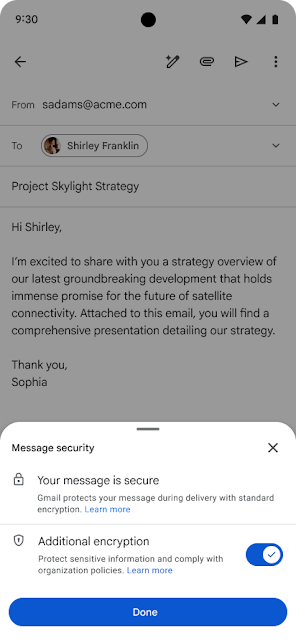

With the 2026 expansion of Client-Side Encryption, the encryption happens on the user’s mobile device before the data reaches Google’s servers. According to Google’s Security Documentation, this ensures that even Google cannot access the email body or attachments, as the organization retains sole custody of the encryption keys.
A common misconception is that this update applies to all Gmail users. Based on the April 2026 rollout schedule, native mobile CSE is currently restricted to:
- Google Workspace Enterprise Plus
- Education Standard & Education Plus
- Required Add-on: Access also requires the Assured Controls or Assured Controls Plus add-on for specific data residency compliance.
For eligible users, the experience is integrated directly into the Gmail app, removing the need for third-party secure portals.
- Admin Activation: IT Administrators must manually enable the feature via the Admin Console under Security > Client-side encryption.
- User Workflow: To secure an email, users tap the lock icon in the compose window and toggle “Additional encryption.” * Recipient Compatibility: If the recipient is not a Gmail user, they are invited to view the message via a secure web-based interface that requires identity verification through a guest account or the organization’s Identity Provider (IdP).
Related article, you may like: Apple Tests End-to-End Encrypted RCS in iOS 26.4 Beta
To ensure accuracy for your organization’s compliance team, note the following documented constraints for CSE on mobile:
- Attachment Cap: Encrypted emails are limited to a 5MB attachment size.
- Metadata Privacy: While the body and attachments are encrypted, the Subject Line, Timestamps, and Recipient list remain unencrypted for server routing.
- Incompatible Features: Shared inboxes (delegation) and email aliases do not currently support CSE mode.
The transition of CSE from desktop-only to a native mobile experience marks a significant step in Google’s “Zero Trust” strategy. By providing these tools, Google is enabling global enterprises to meet strict GDPR and HIPAA requirements without sacrificing mobile productivity.