
Samsung is picking up the pace with its latest software rollout. After initially launching the One UI 8.5 beta (based on Android 16) for its newest flagships, the company is now expanding the program to a much wider range of devices, including older favorites and, for the first time, a mid-range A-series phone.
From cross-platform file sharing to smarter AI tools, here is everything you need to know about the latest update.
Table of Contents
AirDrop Support Finally Lands on Galaxy
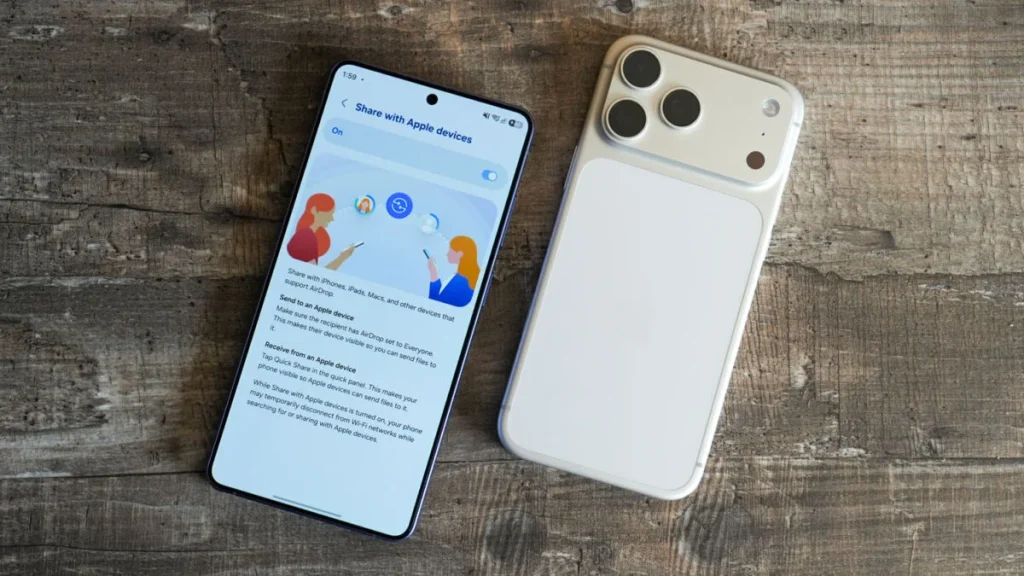
The most surprising addition in this beta is a new bridge between ecosystems. Samsung is introducing support for AirDrop connection through Quick Share. This feature allows Galaxy users to exchange files seamlessly with Apple devices—a move that significantly simplifies life for users who live in “mixed” households or offices.
Currently, this cross-platform support is live for the Galaxy S25 and S26 series, along with Samsung’s latest foldables (Z Fold7 and Z Flip7).
The Ninth Beta Hits the U.S.
For Galaxy S25 users in the United States, the ninth beta build is now officially live. While previous versions focused heavily on backend stability, this update (firmware ending in ZZD5) brings several user-facing refinements:
- Camera Enhancements: Three new creative filters—Classic Film, Pop Film, and Blanc—have been added to the stock camera app.
- Bug Fixes: The update resolves annoying flickers during dual-video recording and fixes an issue where notification cards were being cut off at the top of the screen.
- Smoother Transitions: Improvements have been made to the lock screen and Always-On Display (AOD) to prevent flickering when receiving calls.
Bringing Galaxy S26 AI to Older Phones
Samsung is also proving that you don’t need the absolute newest hardware to get the best features. The One UI 8.5 update is confirmed to bring four major Galaxy AI tools to the Galaxy S24 series:
- Advanced Audio Eraser: Allows you to mute background noise in apps like YouTube or Netflix directly from the Quick Panel.
- Call Screening: An on-device AI that answers calls for you, asks why the person is calling, and provides a live transcript.
- Creative Studio: A new app for designing stickers and wallpapers (currently exclusive to S Pen-compatible devices).
- Improved Photo Assist: Lets you edit photos using text prompts, such as “add a sunset” or “move this person to the left.”
A Long-Awaited Refresh for Samsung Music
In addition to system-wide changes, Samsung is finally updating its native Music app. For years, the Samsung Music widget looked outdated compared to the rest of the interface. With the One UI 8.5 update, the app finally gets modern, rounded widgets with a new 10-step transparency slider, allowing it to blend perfectly with any home screen wallpaper.
How to Join the Beta
The program has now expanded to include the Galaxy S23 series, Z Fold5, Z Flip5, and the Galaxy A54 and A36 5G.
If you want to test the software before the stable release next month, you can register via the Samsung Members app. Once enrolled, navigate to Settings > Software update > Download and install to begin the update.